Operator Privacy Notice
This feature is not available in DWS Mode.
Because it is processing operator data, Honeywell is implementing operator consent in VoiceConsole 6.4 and newer.
The behavior of the privacy notice consent collection depends on the deployment type.
-
Consent collection is required for VoiceConsole SaaS deployments. Consent is enabled by default.
-
Consent collection is optional for VoiceConsole On Prem deployments and can be enabled in System Configuration. Consent is disabled by default.
-
Consent collection is optional for VoiceConsole Hybrid deployments. Customers may be required to collect consent if connecting devices to other solutions.
-
Consent collection is tracked within VoiceConsole.
-
Operators may provide consent via:
-
Kiosk: A link and one-time password (OTP) are generated. The The operator uses this link and one-time password to provide consent.
-
Mobile Device: When implemented at device level, the operator is asked to provide consent on the mobile device if the voice application was written with:
DevKit 2.4 or newer
GWS 4.3 or newer
VoiceCatalyst 5.2 or newer
If the operator of a mobile device with an application written with one of the above, and does not provide consent, the device will not work until consent is given.
-
-
Consent is valid for 18 months from the date of collection.
Configure Privacy Consent Behavior
- For a VoiceConsole On Prem deployment on the System Configuration page, under Other Configuration, set Requires Operator Privacy Consent to Yes. This step is not required for a VoiceConsole SaaS deployment, as this feature is always enabled and mandatory in that environment.
-
If you need to regenerate an OTP for one or more operators, see Regenerate One-Time Passwords for Operators.
Privacy Consent Status Updates
Privacy notice consent is updated when:
-
An operator provides consent via:
-
Kiosk: A link and One-Time Password (OTP) are provided from VoiceConsole. The operator uses this link and their OTP to provide consent.
-
Mobile Device: When implemented at device level, the operator is asked to provide consent on the mobile device if not already provided.
-
-
The consent has expired: Consent is valid for 18 months.
-
The consent is withdrawn: If an operator requests to have consent withdrawn, the supervisor must complete the process.
Privacy Status
The Operators table displays one of the following statuses for each user as well as the time of the last privacy notice change for that user. The details for an individual operator are displayed when selecting an operator and choosing View selected operator.
-
Not Accepted: Privacy notice request has been generated but operator has not consented.
-
Accepted: Operator has consented to privacy notice. The consent may be provided via kiosk or on the device (when supported, see details above).
-
Expired: Operator consent has expired and operator must accept the privacy notice again. When a user has consented to the privacy notice that consent is valid for 18 months unless the user chooses to withdraw their consent.
-
Withdrawn: Operator has notified their supervisor to withdraw their consent to the privacy notice and the supervisor has completed the process.
-
Declined: When presented with the privacy notice consent screen on the device (when supported, see above), the operator clicks back to return to the prior screen without providing consent.
Generate OTP During Operator Creation
- When a new operator is created by an admin, a One Time Password (OTP) is created for that Operator ID.
-
The admin is presented a message that the operator has been created. The message includes a web link and OTP for that operator ID.

This message displays the Operator ID and OTP to be used when accepting the privacy notice.
- The admin shares the web link, the Operator ID, and the OTP with the user.
If you need to regenerate an OTP, see Regenerating a One-Time Password for Operators.
The web link for the privacy consent action is VoiceConsole instance/core/operator/operatorPrivacyNotice.action
Operator Consent
-
The operator is provided with the web link by the admin.
-
The operator follows the link.
-
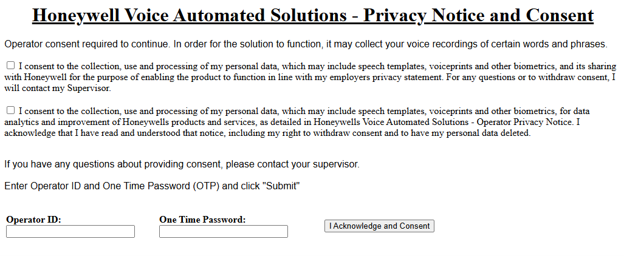
The operator reviews the privacy notice and enters the Operator ID and OTP then clicks I Acknowledge and Consent if they consent to the Privacy Notice.
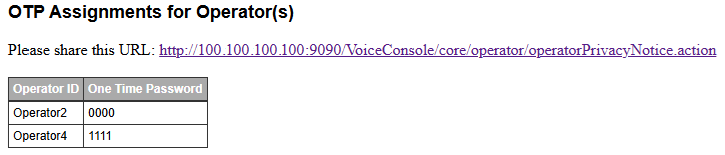
The admin shares the web link, the Operator ID, and the OTP with the user.
Withdraw Consent
If an operator wishes to withdraw their consent the operator notifies an admin who follows this procedure:
- From VoiceConsole, select Operators.
- From View Operators, select one or more operators.
-
In Operator Actions, select Manage operators > Withdraw privacy consent for selected operator(s).
