Operator Privacy Notice
The behavior of the privacy notice consent collection depends on the deployment type.
-
Consent collection is required for VoiceConsole SaaS deployments.
-
Consent collection is optional for VoiceConsole On Prem deployments and can be enabled in System Configuration.
-
Consent collection is optional for VoiceConsole Hybrid deployments. Customers may be required to collect consent if connecting devices to other solutions.
-
Consent collection is tracked within VoiceConsole.
-
Operators may provide consent via:
-
Kiosk: A link and One time Password (OTP) are provided from VoiceConsole. The operator uses this link and their OTP to provide consent.
-
Mobile Device: When implemented at device level, the operator is asked to provide consent on the mobile device if not already provided. See below for device support.
-
-
Consent is valid for 18 months from the date of collection.
-
VoiceConsole only tracks consent. VoiceConsole does not limit any operator functions based on consent. However, mobile voice devices may check that the operator has completed the privacy consent within VoiceConsole (when required) and can block the operator from certain functions until consent is provided. See below for device support.
Device Support for Privacy Consent
Device consent collection and enforcement requires software upgrades. This function is added with DevKit 2.4 for Android devices. Refer to DevKit Release Notes and online help for details. This function is to be included in a future Voice Catalyst release. Refer to VoiceCatalyst Release Notes for availability.
Configure Privacy Consent Behavior
- For a VoiceConsole On Prem deployment on the System Configuration page, under Other Configuration, set Requires Operator Privacy Consent to Yes. This step is not required for a VoiceConsoleSaaS deployment as this feature is always required there.
- If an OTP (One Time Password) has expired, see Regenerate OTP. The OTP expires after two hours.
Privacy Status
The Operators table displays one of the following statuses for each user as well as the time of the last privacy notice change for that user. The details for an individual operator are displayed when selecting an operator and choosing View selected operator.
-
Not Accepted: Privacy notice request has been generated but operator has not consented.
-
Accepted: Operator has consented to privacy notice. The consent may be provided via kiosk or on the device (when supported, see details above).
-
Expired: Operator consent has expired and operator must accept the privacy notice again. When a user has consented to the privacy notice that consent is valid for 18 months unless the user chooses to withdraw their consent.
-
Withdrawn: Operator has notified their supervisor to withdraw their consent to the privacy notice and the supervisor has completed the process.
-
Declined: When presented with the privacy notice consent screen on the device (when supported, see above), the operator clicks back to return to the prior screen without providing consent.
Privacy Consent Status Updates
Privacy notice consent is updated when:
-
An operator provides consent via:
-
Kiosk: A link and One time Password (OTP) are provided from VoiceConsole. The operator uses this link and their OTP to provide consent.
-
Mobile Device: When implemented at device level, the operator is asked to provide consent on the mobile device if not already provided. See below for device support.
-
-
The consent has expired. Consent is valid for 18 months,
-
The consent is withdrawn. If an operator requests to have consent withdrawn, the supervisor must complete the process
Generate OTP During Operator Creation
- When a new operator is created by an admin, a One Time Password (OTP) is created for that Operator ID.
-
The admin is presented a message that the operator has been created. The message includes a web link and OTP for that operator ID.

This message displays the Operator Name and OTP. The operator must use the Operator ID (not the Operator Name) when accepting the privacy notice.
- The admin shares the web link, the Operator ID, and the OTP with the user.
The web link for the privacy consent action is <VoiceConsole instance>/core/operator/operatorPrivacyNotice.action
Operator Consent
-
The operator is provided with the web link by the admin.
-
The operator follows the link.
-
The operator reviews the privacy notice and enters the Operator ID and OTP then clicks I Accept the Privacy Notice if they consent to the Privacy Notice.

-
After consent the operator can perform work in VoiceConsole. If the operator chooses not to provide consent, that operator is unable to work in VoiceConsole.
Regenerate OTP
If the operator OTP is lost or has expired, or if the operator needs to provide consent again (after withdrawing consnet or the consent period has expired) a new OTP can be generated:
- From the VoiceConsole tab, select Operators.
- From the View Operators list, select one or more operators.
-
Click on Regenerate OTP for selected operator(s).
-
The success message is displayed.

-
Click the link in the message to display the results.
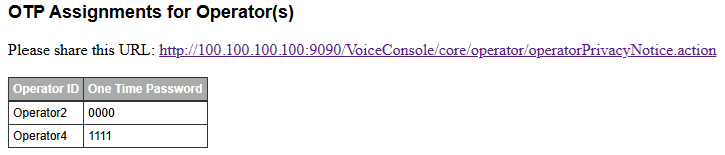
- The admin shares the web link, the Operator ID, and the OTP with the user.
Withdraw Consent
If an operator wishes to withdraw their consent the operator notifies an admin who follows this procedure:
- From the VoiceConsole tab, select Operators.
- From the View Operators list, select one or more operators.
-
In the Operator Actions area, select Manage operators > Withdraw privacy consent for selected operator(s).
