Removing a Battery from an SRX2/SRX3 Wireless Headset
Do not remove the battery from the SRX2 or SRX3 headset until the LED indicator on the headset is off.
- Power off the headset by pressing and holding the Power button on the electronic module for one second.
- Grasp the headset by the sides of the electronic module with your thumb and
fingers on the black battery latches.
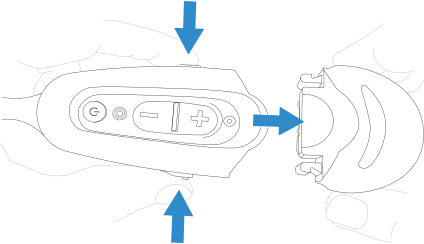
- With your other hand, hold the battery at the end of the electronic module opposite the mic boom.
- Press and hold both battery latches at the same time, squeezing them into the sides of the electronic module until the battery releases from the electronic module.