Training Using a Printed List of Words
If you suspect operators may have a difficult time recognizing the words the device is speaking during training, you can create a print out of the words used in the task that the device asks the operators to train.
- If a current operator has previously performed the task the new operator is going to use, go to VoiceConsole and perform the steps for viewing an operator’s voice templates using the current operator. See Managing Operator Numbers in the VoiceConsole online help for more information.
- On the Manage Operator Templates:<operator name> page in VoiceConsole, print the list of trained words. See Viewing Printable Versions of List Data in the VoiceConsole online help.
- If necessary, on the printed list, circle commonly misheard or confusing
words.Printed List with Commonly Misheard or Confusing Words Circled
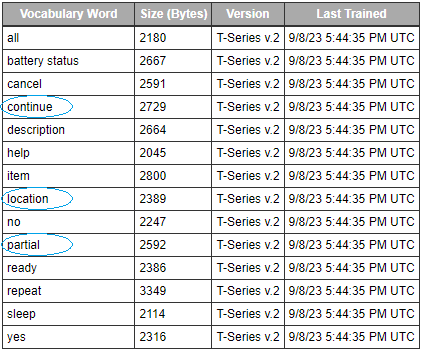
- Honeywell recommends the new operator review the list prior to training so the operator is familiar with the words that are used
If templates have not been trained for the task the new operator is going to use, have the supervisor or current operator train templates for that task and perform the steps above. To proceed with the actual training, follow the detailed list of instructions in the “Training with the Talkman Only” section above.