Review A700/A700x/A700XP VMT Installation Best Practices
Talkman devices and accessories are designed to provide reliable service when used as recommended. The thousands of Talkman VMT equipment users around the world who have followed the best practices outlined here are enjoying increased productivity with Talkman devices integrated on their vehicles.
Do not remove Talkman A700/A700x/A700XP devices from VMT configurations
Talkman VMT devices were designed and intended for easy installation. They were not designed for frequent removal.
The exception is the Talkman A730 which was designed to be removed from the holster for occasional scanning, not to exceed approximately six times per hour. Even if the A730 is not being removed for scanning, it requires a battery for backup power.
Honeywell does not support configurations of the A700/A700x without a battery.
Honeywell recommends that Talkman devices and cables be left in place after they are installed in vehicles. While these components may be removed for maintenance or temporary use in other areas, they should not be removed as a part of regular operation.
Frequent removal of the Talkman or cable can cause a premature mechanical failure to the cable or dock. This damage is not covered by normal product warranty.
Protect Talkman devices from damage
A Talkman device should be mounted on a vehicle in a location where operators can easily access Talkman controls and where the device is well protected from bumps or damage when the vehicle is in use. While recessed mounting offers good protection, the installer must ensure that this mounting does not interfere with Wi-Fi or Bluetooth connectivity of the Talkman device.
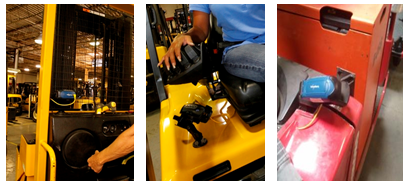
Do not mount the device in the driver's area of the vehicle or areas where it can distract the driver.
Consider additional options from RAM Mounts
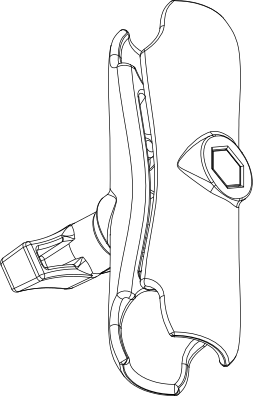
In particular, the following standard RAM Mounts parts provide additional mounting flexibility.
| Part Description | Part Number | Usage | Image |
|---|---|---|---|
| Double 1" ball adapter | RAM-B-230U | The adapter offers more articulation to maneuver and position the Talkman device in a protected area of the vehicle. |

|
| Double socket arm B Ball A length | RAM-B-201U-A | This arm and other arm lengths offer options for the best vehicle fit. |
|
Lock parts into place if they might be moved during normal operations
The parts used for mounting the Talkman were designed for a fixed position with easy adjustment. While unlikely, these parts may loosen over time with inadvertent impacts of daily use—especially if the mountings have not been firmly secured or if workers attempt to adjust the mounting manually.
To prevent this issue, remove the user-adjustable handle on the arm and install a 1/4" #20 nylon lock nut provided with the Honeywell VMT kit. The lock nut cannot be loosened by hand and resists most vibrations.
Secure VMT cabling
The cables and wiring that connect the Talkman VMT must be well secured to the vehicle so that they do not get caught on anything. Snagged cables could result in an accident and damage to the VMT or vehicle.
Separate the cabling from other wiring in the vehicle and ensure that it is routed away from sharp edges.